Flowly Pro, for UK garages and mobile mechanics

Run the garage from your phone, tablet or laptop.

Swap the diary for a proper calendar, invoices and every job saved.

Reg lookup, digital health checks, customer approvals, job cards and reminder texts, all in one place. Built by someone with 14 years in the trade.

£29 a month after the 14-day free trial.

Prefer to buy once and run it offline? Standard, £49 Buy Standard, £49 or on Etsy
Garages are reviewing Flowly. Read what they say on Trustpilot →
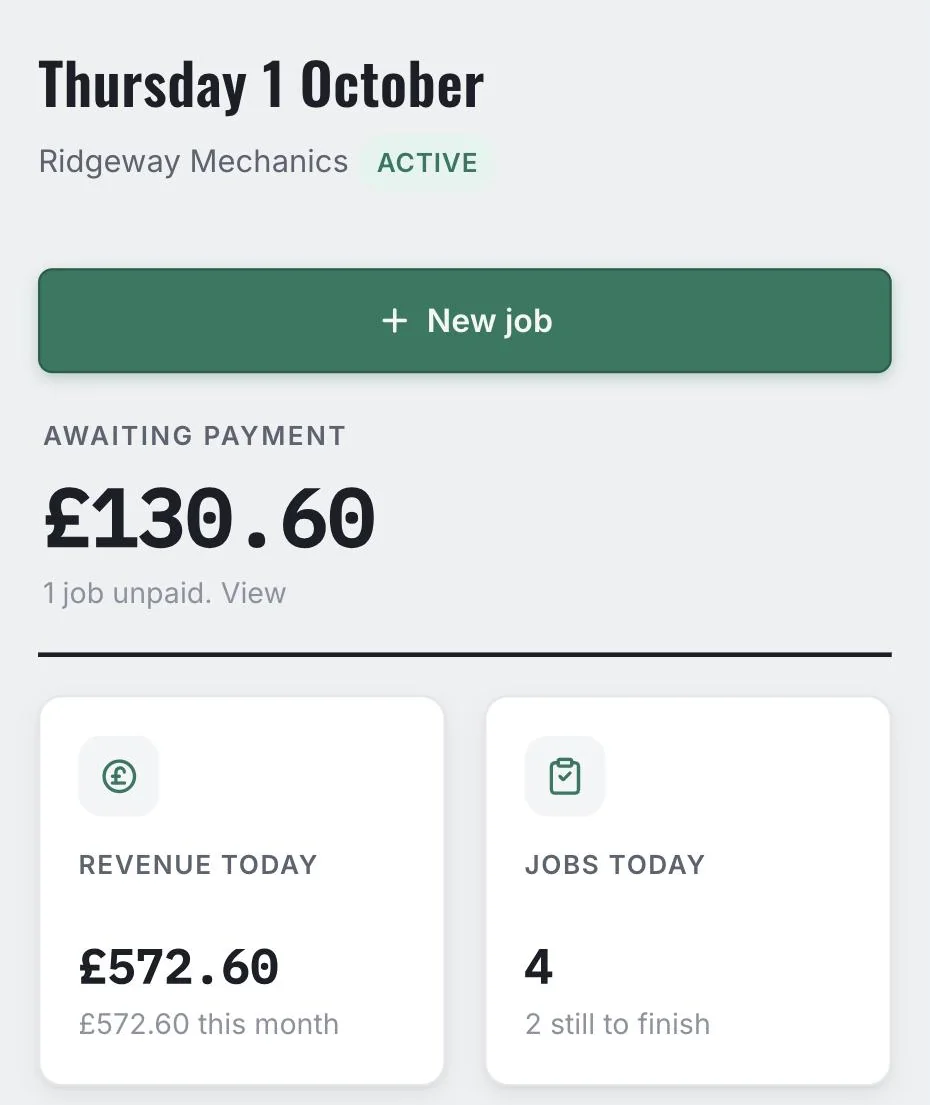
Flowly Pro dashboard for Ridgeway Mechanics, showing today's jobs, money awaiting payment and revenue for the day
Works on iPhone, Android and any computer Bring your Standard data across in one go Support from a real person on WhatsApp
Flowly Pro in use

One job, start to finish

A vehicle in for front brakes. The health check turns up worn rear pads too, the customer says yes on their phone, the tech gets the job card, and it's paid by teatime. These are the real screens.

Reg lookup & MOT history

Type the reg. Everything else fills in.

Make, model, MOT expiry and the advisories from the last MOT come up from the reg. Tap Add as job and the booking form is already filled in. If the car's already on file it finds the customer, even when they've got more than one car.

Reg lookup & MOT history, then Add as job. It finds Sarah and both her cars.
Or book straight from the calendar
The Flowly Pro month view for October 2026, with jobs showing their booking times, including a 10am MOT on Thursday 8th
Every booking shows its time, so you can see the 10am MOT and fit the next job round it.
The health check

Mark what you find, put a price on it, text it over.

Each item is OK, advisory or needs doing, with a note and a price. One tap texts the customer a link to the lot, so you're not on the phone explaining brake pads.

Rear pads marked needs doing, tyres advisory, then texted to the customer.
The customer decides

They say yes or no on their phone. In writing.

The customer gets a text, opens the health check and taps Yes, go ahead or Not this time on each item. Their answers land in Customer Approvals, and one tap adds the approved work to the job. No more "I never agreed to that".

Jen says yes to wipers and no to brake fluid. The £22 wipers go on her job.
Into the workshop

Job card to your tech, by text or on paper.

Pick a technician and text it to them. They open the job on their phone and tap Mark this job complete when it's done, and you see it on the job. Rather not text your techs? Print the job card instead. It has the job, the vehicle and the work, with no prices on it.

Pick Dan and text him the job. You see when he's marked it done. Or print it: no prices on the paper copy.
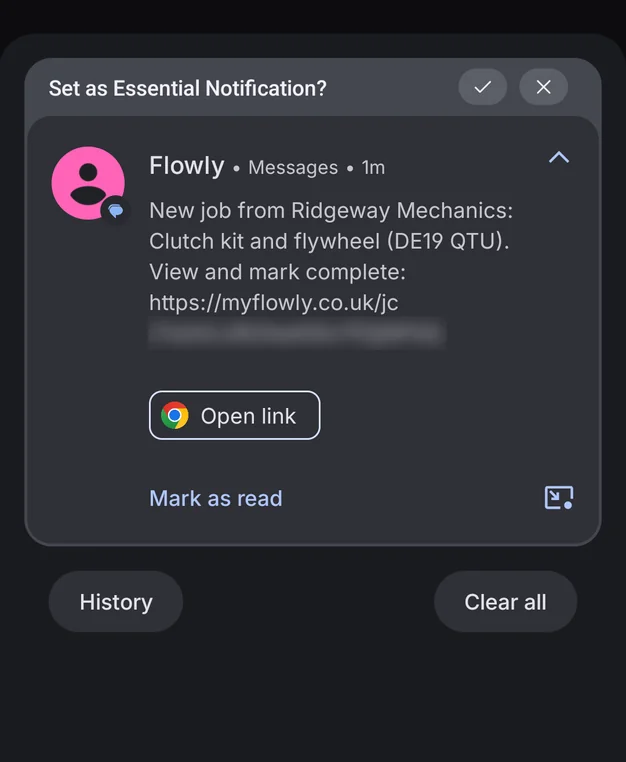
The job card text on Dan's phone: New job from Ridgeway Mechanics, Clutch kit and flywheel (DE19 QTU), with a link to view and mark it complete
What Dan gets: one text with a link to the job.
Done and paid

Ready to collect, then paid.

Mark the job done and send the ready to collect text in the same step, so it lands on the customer's phone straight away. When they pay, pick how, and the invoice is numbered with your bank details on it.

Done, ready to collect text, then paid by card. It goes down as invoice #1002.
The invoice

An invoice that helps you get paid.

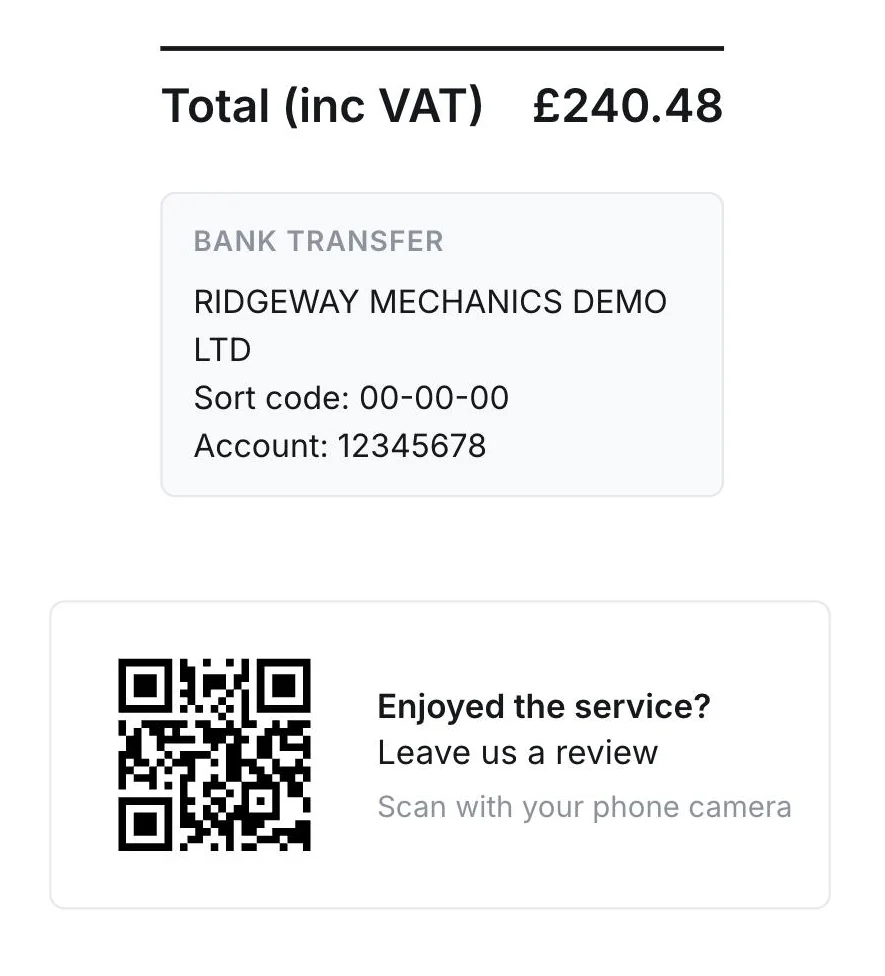
Every paid job gets a numbered invoice you can print, email or send on WhatsApp. If a customer's paying by bank transfer, they can see exactly where the money goes.

The bottom of invoice #1002: total £240.48, a bank transfer box (RIDGEWAY MECHANICS DEMO LTD, sort code 00-00-00, account 12345678) and a QR code to leave a review
Optional on every invoice: your bank details so customers know where to pay, and a QR code that takes them straight to leave you a Google review.
Follow-ups

Reminders that send themselves.

Flowly works out who's due from the MOT and service dates on file, and texts them about three weeks before, only if they've agreed to reminders. Every text has a stop link. Need to chase one sooner? You can send it yourself from the same list.

Who's due and when, all in one list.
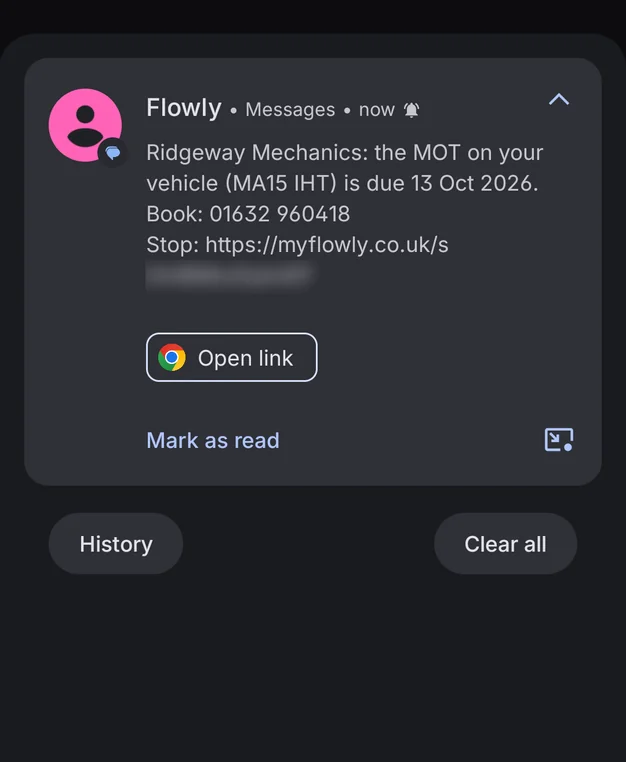
The MOT reminder text on the customer's phone: Ridgeway Mechanics, the MOT on your vehicle (MA15 IHT) is due 13 Oct 2026, with the garage's number and a stop link
The reminder as your customer gets it, stop link included.
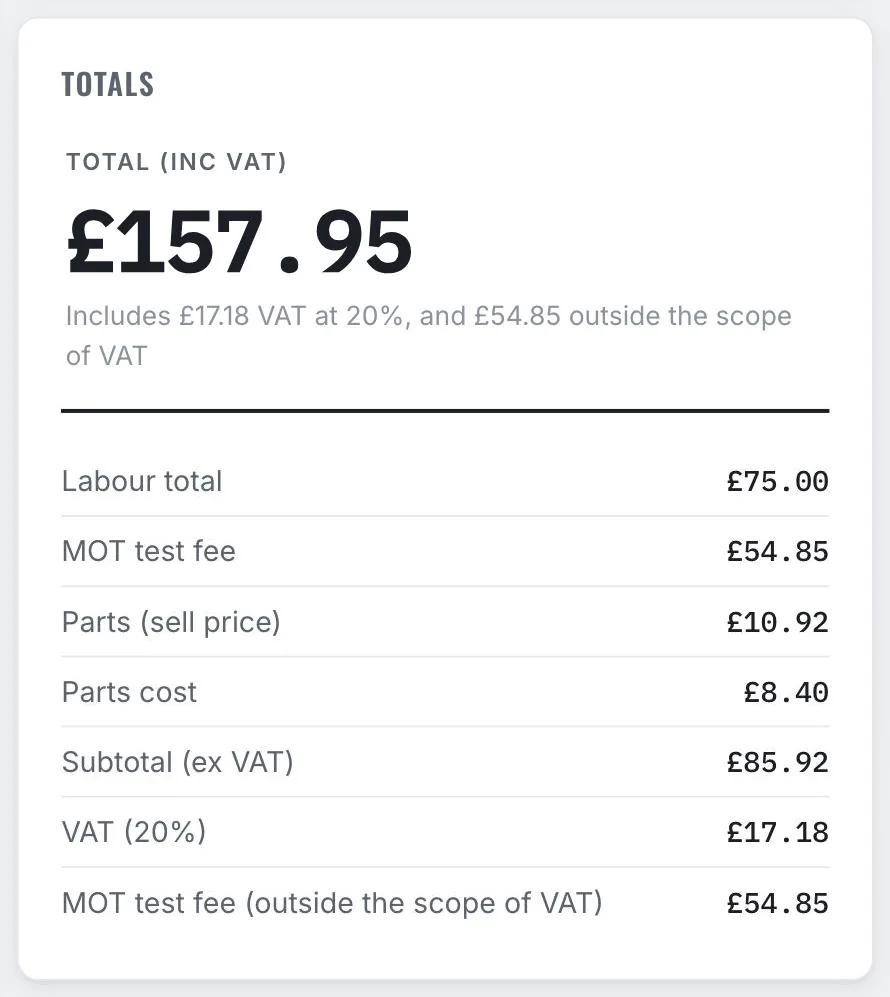
Job totals in Flowly Pro: VAT at 20% on the labour and parts, with the £54.85 MOT test fee outside the scope of VAT

MOT fee and VAT, done right

VAT registered? Mark the MOT test fee and it's kept outside the VAT on the invoice, the rest of the job isn't.

No reg? No problem.

Trailers and anything else without a plate get booked in like any other job.

Accountant-ready export

Two CSVs for any date range: every invoice with its VAT breakdown, and every expense.

New bits, as they ship

Pro keeps getting updated. What's new in the app tells you what's changed, newest first.

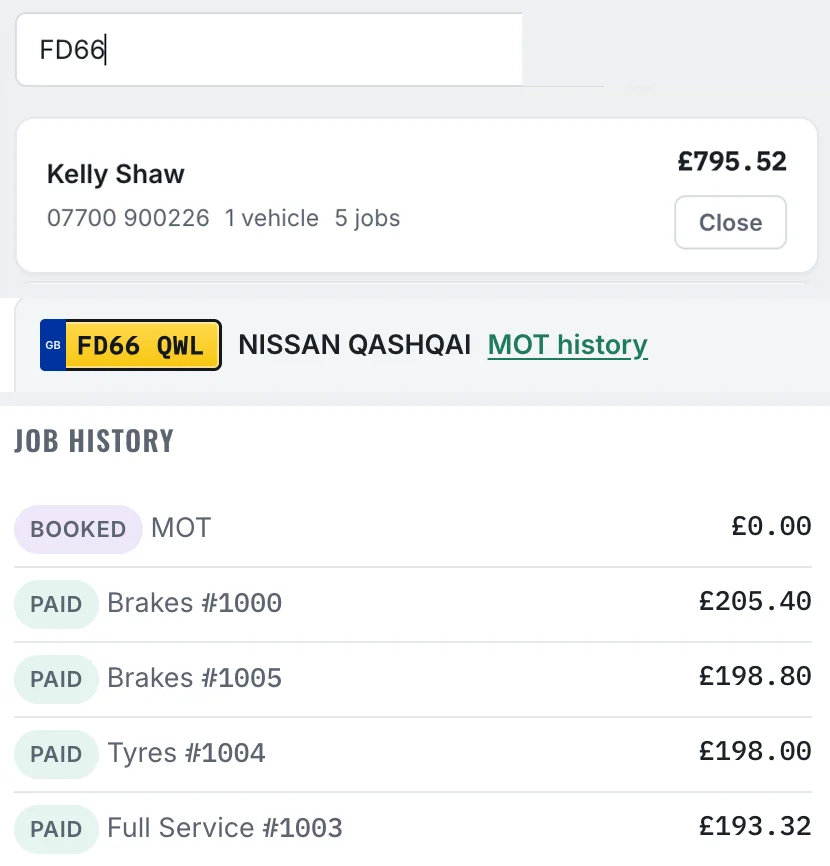
Searching FD66 in Flowly Pro customers finds Kelly Shaw and her Nissan Qashqai, with her job history: an MOT booked in, then four paid jobs, two brake jobs, tyres and a full service, invoices #1000 to #1005

Every job saved, no ringing round

Search a name, phone number or reg and open the customer. Their cars and every job they've had with you are there, with the status, invoice number and price.

Flowly Standard

Rather buy once and keep it offline?

Standard is a single file you open in your browser. £49, once. No account, no monthly fee, and your data never leaves your device. It runs on a computer or an Android phone or tablet, not on iPhone.

The full Standard walkthrough. Nothing loads from YouTube until you press play.

  • Job booking, quotes and VAT invoices
  • Customer and vehicle records, MOT and service dates
  • Calendar, payments and expenses
  • Printed job cards and technicians
  • Health check template and accounting export
  • Move to Pro later and bring everything with you
Flowly Standard calendar
Standard: the monthly calendar
Flowly Standard payments screen
Standard: money in and money out
Side by side

Which one's right for you?

Same core booking, quoting and invoicing either way. Standard keeps you offline, one-off and account-free. Pro goes online for reg lookup, health checks your customer can answer, texts and every device.

FeatureStandardPro
Price£49 once£29/mo
The same in both whichever you choose
Job booking and quotesYesYes
VAT invoicingYesYes
Customer and vehicle recordsYesYes
Track payments, mark jobs paidYesYes
Expense trackingYesYes
CalendarYesYes
Accounting export (CSV)YesYes
Support from a real personYes, WhatsApp or emailYes, WhatsApp or email
Where they differ this is the part that decides it
Print, email or WhatsApp invoicesOpens your email, filled inSent in one click
Job cardsPrintPrint, or text to the tech's phone
Health checksOffline templateDigital, sent to the customer
Customer approves extra work on their phoneNoYes
Reg lookup & MOT historyNoYes, included
MOT and service datesEnter them yourselfAuto-filled from the reg
Automatic reminder textsNoYes, 100 a month, then 5p each
Ready to collect textsNoYes
Works fully offlineYesNo
Works on iPhoneNo, computer or Android onlyYes, every device
More than one deviceNoYes
Survives a lost or broken deviceNoYes
BackupManual, you save the fileAutomatic
Product updatesNo, what you buy is what you keepYes, with What's new in the app
Account and login requiredNoYes
Pricing

Two ways in. No surprises either way.

Subscribe to Pro, or pay once for Standard. No hidden tiers, and neither is bundled into the other.

Flowly Pro
£29 /month
After the 14-day free trial.
Free 14-day trial, cancel any time
  • Every device, including iPhone
  • Reg lookup & MOT history
  • Digital health checks with customer approvals
  • Job cards and reminder texts, 100 a month included
  • Data survives a lost or broken device
Flowly Standard
£49 once
Not a subscription, ever
Garage software elsewhere: £600+/year
  • Works fully offline
  • Computer or Android, not iPhone
  • Your data never leaves your device
  • Yours to keep, no account and nothing to renew
Questions

Straight answers

What's the difference between Pro and Standard?
Pro is online: it works on every device, looks up regs, sends health checks and texts, and backs itself up. Standard is a one-off file that works offline on one computer or Android device. The core booking and invoicing is the same in both.
How much is Pro?
£29 a month after the 14-day free trial. You can cancel any time.
Do texts cost extra?
100 texts a month are included with Pro. After that it's 5p a text, bought in packs, and the credits don't expire.
I already use Standard. Can I move to Pro?
Yes. Export a backup from Standard, then in Pro go to Settings and press Bring my data across. Your customers, vehicles, jobs and expenses come over in one go, and your offline file isn't touched.
Is Standard really a one-time payment?
Yes. £49, once. No account is created, nothing renews, nothing gets billed later.
Do I need to install Standard?
No, it's a single file that opens in your browser on a computer, or on an Android phone or tablet. It doesn't run on iPhone or iPad. No app store, no login.
Does it work on iPhone?
Pro does, along with Android and any computer. Standard doesn't run on iPhone or iPad.
Where does my data go?
With Standard, nowhere but your own device. With Pro, it's stored online so it's there on every device and safe if one breaks.
What happens if I clear my browser data with Standard?
Standard keeps your data in the browser, so clearing site data removes it. That's why the backup in Settings matters. Back up before any browser clean-up.
Is it VAT-ready?
Yes, both are. Switch VAT on in Settings, set your rate, and choose whether you enter prices with or without VAT. Invoices show the breakdown automatically.
Try Pro free for 14 days.

£29 a month after that. Or buy Standard once for £49.

Start your free trial → Buy Standard, £49 Ask on WhatsApp